
Users can add funds to their 88DD account through the payment methods currently available inside the app. Since payment options and limits can change, always check the latest details in the Wallet or Deposit section before sending money.
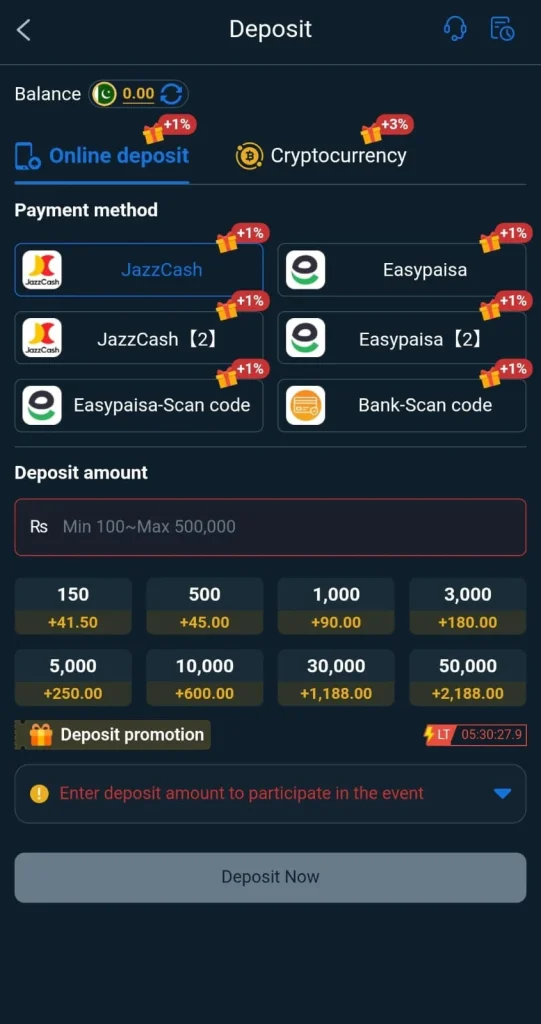
How to Deposit on 88DD
Follow these steps:
- Log in to your 88DD account.
- Open the Wallet or Deposit section.
- Choose an available payment method.
- Enter the amount you want to deposit.
- Check the payment details carefully.
- Complete the payment through the selected method.
- Save the transaction ID or payment receipt.
- Return to the app and check your wallet balance.
JazzCash and Easypaisa
If JazzCash or Easypaisa appears as an available option inside 88DD, follow the payment instructions shown in your account. Do not send money to random numbers shared through WhatsApp, Telegram, Facebook, or unknown agents
Deposit Limits
Minimum and maximum deposit limits may apply depending on the payment method.
Before sending money, check:
- Minimum deposit amount
- Maximum deposit amount
- Available payment methods
- Any service fee
- Bonus conditions
- Processing time
Deposit Pending?
If your payment is completed but your balance does not update:
- Check your transaction history.
- Confirm that the payment was successful.
- Refresh or reopen the app.
- Keep your transaction ID ready.
- Avoid making the same deposit again immediately.
- Contact the support option available inside 88DD if needed.
Deposit Safety Tips
- Double-check payment details before sending money.
- Keep a screenshot or receipt of every payment.
- Never share your JazzCash or Easypaisa PIN.
- Never share your OTP.
- Avoid unknown payment numbers.
- Start with a small amount if you are using the platform for the first time.
Final Note
The 88DD deposit process is simple when you use the payment methods displayed inside the app. Always verify the payment details, keep transaction records, and check the latest deposit rules before adding funds.